







Enterprise VMware & Hyper-V Virtualization
Enterprise VMware & Hyper-V Virtualization Solutions for Scalable, Secure, and High-Performance IT Infrastructure
Zero Trust Architecture Deployments Worldwide
Reduction in Successful Lateral Attacks
Faster Threat Detection and Response
Access Verification Rate Achieved
What Is Server Virtualization and Why Does Your Business Need It?
Server virtualization using VMware and Microsoft Hyper-V allows multiple virtual machines (VMs) to run on a single physical server — each isolated and independently managed. This eliminates hardware sprawl, reduces energy consumption, and lets IT teams provision new environments in minutes rather than days.
From VMware vSphere and ESXi hypervisor to Hyper-V on Windows 11 Pro, T-Tech Solutions Lab designs custom virtualization architectures that align with your workload demands. Our expertise spans VMware and Linux integration, Hyper-V VM backup and clone automation, and end-to-end desktop hypervisor deployments — delivering enterprise reliability at every scale.
How T-Tech Solutions Lab Pvt Ltd Solves Your Zero Trust Architecture Challenges
01
Outdated Perimeter Security
We replace weak perimeter walls with NIST SP 800-207 Zero Trust Architecture that verifies every access request, every time.
02
Invisible Insider and Lateral Threats
Our zero-trust network architecture uses micro-segmentation and continuous monitoring to stop threats from spreading inside your network.
03
Complex Hybrid and Cloud Access
We deliver unified zero trust controls that work seamlessly across on-premise, cloud, and remote environments.
04
Overwhelming Manual Policy Management
Automation and AI-driven policies based on NIST SP 800-207 Zero Trust Architecture remove guesswork and reduce human errors.
05
High Cost of Running a SOC
We optimize tools, processes, and automation to deliver high performance at a much lower total cost.
06
Poor User Experience and Productivity Loss
Just-in-time and context-aware access keeps security strong while making work frictionless for your teams.
07
Compliance and Audit Pressure
Built-in reporting and continuous validation help you meet NIST SP 800-207 Zero Trust Architecture, GDPR, and other standards effortlessly.
08
Scalability Issues with a Growing Workforce
Our modern zero-trust architecture grows automatically with your business, users, and cloud footprint.
09
Legacy Tools That Can’t Keep Up
We modernize your security with next-generation, AI-powered zero trust solutions that adapt in real time.
Our Virtualization Services — VMware & Hyper-V Solutions
Our Virtualization Services
We plan, install, and configure VMware vSphere and ESXi hypervisors on your physical servers, enabling enterprise-grade server virtualization. Our team handles VMware download, licensing, vCenter Server setup, cluster configuration, and performance tuning — delivering a production-ready virtual environment with high availability and fault tolerance built in from day one.
Our engineers provide complete Microsoft Hyper-V installation on Windows Server and Windows 11 Pro, covering how to set up Hyper-V on Windows 11 Pro, virtual switch creation, Hyper-V VM provisioning, and resource management. We also support install Hyper-V on Windows 11 for developer and test environments, ensuring your virtual machine in Hyper-V performs optimally.
For teams needing desktop virtualization, we deploy and manage VMware Workstation hypervisor, VMware Desktop Hypervisor Pro, and VMware Fusion for Mac environments. Our solutions include virtual machines in a VMware setup, snapshot management, and VMware desktops configuration — giving developers and QA teams isolated, secure sandbox environments on any operating system.
We implement robust Hyper-V VM clone and backup Hyper-V VM strategies to protect your critical workloads. Our disaster recovery solutions include Hyper-V Replica, automated checkpoint scheduling, offsite VM export, and rapid failover testing — ensuring your business continuity targets (RTO/RPO) are consistently met, regardless of hardware failure or data loss.
We design and deploy VMware Horizon environments for Virtual Desktop Infrastructure (VDI), enabling remote workforces to access secure, centrally managed desktops from any device. Our VDI solutions reduce endpoint costs, enhance data security, and support VMware Horizon scalability from 10 to 10,000+ concurrent users — ideal for education, banking, and enterprise organizations.
Migrating between platforms? We handle VMware to Hyper-V and Hyper-V to VMware migrations with zero-downtime strategies, including P2V (physical-to-virtual), V2V (virtual-to-virtual) conversions, and cross-hypervisor workload mobility. Our team evaluates VMware vs Hyper-V trade-offs and recommends the optimal platform based on your existing infrastructure, licensing, and growth plans.
T-Tech specializes in VMware and Linux environments, deploying VMware Linux virtual machines on ESXi and Workstation. We configure Linux guest OS tuning, VMware Tools installation, open-VM-tools setup, and network optimization — ensuring your VMware Linux VMs deliver maximum throughput for workloads including web servers, databases, containerized applications, and DevOps pipelines.
We assist organizations in deploying install ChromeOS Flex on Hyper-V for cost-effective thin-client environments. Our team also virtualizes alternative operating systems including Ubuntu, CentOS, Debian, and custom appliances on Microsoft Hyper-V — giving your IT department the flexibility to run diverse workloads on a single, centrally managed hypervisor platform.
Why Choose T-Tech Solutions Lab for VMware & Hyper-V Virtualization?
At T-Tech Solutions Lab, we don’t just install hypervisors — we architect production-hardened virtualization environments that scale with your business. Our team combines VMware Certified Professionals (VCP) and Microsoft-certified Hyper-V specialists with real-world deployment experience across SMBs, enterprises, and government institutions. Here’s what sets us apart
Certified Expertise
End-to-End Delivery
Platform-Agnostic Advice
Proven Migration Methodology
Security-First Design
24/7 Monitoring & Support
Cost Optimization
Local Presence, Global Standards
VMware VCP and Microsoft-certified engineers for VMware vSphere, Hyper-V, and VMware Horizon.
From initial assessment and architecture design to deployment, migration, and ongoing managed support.
Honest VMware vs Hyper-V comparisons to recommend the best fit for your budget and workload — no vendor bias.
Zero-downtime P2V and V2V migrations with documented rollback procedures and post-migration validation.
Secure hypervisor configurations, VM network segmentation, encrypted VM storage, and compliance-ready setups.
Proactive VMware and Hyper-V health monitoring with rapid incident response SLAs.
Server consolidation analysis to reduce hardware footprint and licensing costs — ROI-driven virtualization.
Based in Pakistan, delivering enterprise virtualization services at competitive rates with international quality benchmarks.
Technologies & Platforms We Work With
HPE ProLiant Blade & Rack Servers
Cisco UCS Blade Servers
Lenovo ThinkSystem
IBM Power Servers
VMware vSphere
Microsoft Hyper-V
Proxmox VE
Red Hat OpenShift / KVM
Windows Server 2019 / 2022
Red Hat Enterprise Linux (RHEL 8/9)
Ubuntu Server 22.04 LTS / 24.04 LTS
VMware ESXi, CentOS Stream
Dell EMC, NetApp ONTAP, HPE Nimble Storage
iSCSI, Fibre Channel (FC), NFS, SMB Protocols
RAID 5/6/10 Configuration for data redundancy
ZFS, LVM, CIFS Shares
HPE iLO / Dell iDRAC
Nagios XI, Zabbix, PRTG Network Monitor
Ansible for automated server provisioning
Microsoft SCOM, SolarWinds Server Monitor
Cisco Catalyst / Nexus Switching
HPE FlexFabric, Aruba Networking
VLANs, Link Aggregation (LACP), Jumbo Frames
InfiniBand, 10GbE, 25GbE, 100GbE connectivity
Choosing between VMware and Hyper-V is one of the most common IT infrastructure decisions. VMware vSphere offers a richer enterprise feature set — advanced HA, DRS, vMotion — while Microsoft Hyper-V integrates natively with Windows Server and Azure, often at lower licensing cost. For organizations already invested in the Microsoft ecosystem, Hyper-V delivers seamless Active Directory and Azure hybrid integration.
For large-scale enterprise workloads demanding vSphere vs Hyper-V performance, VMware typically leads in VM density and advanced networking via NSX. Hyper-V wins on Windows licensing synergies and free Hyper-V availability in Windows Server Datacenter edition. T-Tech’s experts conduct workload assessments to recommend the optimal hypervisor — ensuring your investment in server virtualization delivers measurable ROI.
Installing Hyper-V on Windows 11 requires Windows 11 Pro, Enterprise, or Education edition with a 64-bit CPU, SLAT support, and 4 GB+ RAM. Enable the feature via Windows Features → Hyper-V or use PowerShell: Enable-WindowsOptionalFeature -Online -FeatureName Microsoft-Hyper-V-All. After reboot, Hyper-V Manager is ready to create your first Hyper-V VM with custom CPU, memory, and virtual switch settings.
For advanced setups, installing Hyper-V on Windows 11 also supports nested virtualization, allowing VMware Workstation inside Hyper-V for hybrid lab environments. T-Tech’s team handles complete Hyper-V configuration and optimization — from initial Hyper-V download and role activation to production-ready Hyper-V VM clone, backup, and replication pipelines — so your team stays focused on business, not infrastructure.
For large-scale enterprise workloads demanding vSphere vs Hyper-V performance, VMware typically leads in VM density and advanced networking via NSX. Hyper-V wins on Windows licensing synergies and free Hyper-V availability in Windows Server Datacenter edition. T-Tech’s experts conduct workload assessments to recommend the optimal hypervisor — ensuring your investment in server virtualization delivers measurable ROI.
Discovery & Assessment
Audit existing servers, workloads, network topology, and licensing. Evaluate VMware vs Hyper-V suitability. Define KPIs, RTO, and RPO targets.
Architecture Design
Design virtual infrastructure: hypervisor selection (VMware ESXi / Microsoft Hyper-V), cluster topology, storage (vSAN/S2D), networking (NSX/vSwitch), and backup strategy.
Proof of Concept
Deploy pilot environment. Validate VM performance, Hyper-V VM clone and backup procedures, VMware HA/DRS policies, and security configurations before full rollout.
Deployment & Migration
Execute P2V/V2V migrations using VMware Converter or Hyper-V Import/Export. Zero-downtime cutovers with documented rollback plans and stakeholder sign-off.
Optimization & Hardening
Tune VM resource allocation, configure secure hypervisor settings, implement RBAC, and optimize VMware Linux and Windows guest performance post-deployment.
Training & Handover
Train your IT team on VMware vCenter, Hyper-V Manager, backup procedures, and monitoring tools. Provide full as-built documentation.
Managed Support
Ongoing 24/7 monitoring, patch management, capacity planning, and proactive alert response for VMware and Hyper-V environments.
Our Server Deployment Process — Step by Step
Virtualization Service Packages & Pricing Plans
Feature | Starter | Professional | Enterprise |
Target Users | SMBs & Startups | Growing Businesses | Large-Scale Enterprise |
Platform Setup | Hyper-V / VMware Workstation | VMware vSphere / Hyper-V Cluster | Full VMware vSphere / Hyper-V Cluster Design |
Number of VMs | Up to 5 VMs | Up to 20 VMs | Unlimited VMs |
High Availability (HA/DRS) | Not Included | Included | Advanced Included |
Backup Solution | Basic VM Backup | Veeam + Hyper-V Replica | Advanced Backup + DR Strategy |
Virtual Networking | Virtual Switch Config | Advanced Networking | VMware NSX |
Storage | Standard Storage | Standard Storage | vSAN / S2D Storage |
VDI (Virtual Desktops) | Not Included | VMware Horizon (25 Users) | VMware Horizon (100+ Users) |
Migration (P2V/V2V) | Not Included | Up to 10 Servers | Included (Large Scale) |
Disaster Recovery | Not Included | Partial | Full DR + Site Replication |
Monitoring | Basic | Standard | Advanced Monitoring |
Support Duration | 30 Days | 90 Days | 24/7 Support + SLA |
Documentation | Included | Included | Included |
Pricing | Contact for Pricing | Contact for Pricing | Custom Quote |
Industries we serve
Banking & Financial Services
Secure 24/7 SOC monitoring with strict compliance to protect customer funds, prevent fraud, and meet regulatory requirements like PCI-DSS.
Healthcare & Pharmaceuticals
Protected Security Operations Center for patient data privacy, rapid threat response, and full HIPAA & regulatory compliance.
Retail & E-commerce
Always-on SOC protection for online transactions, customer data, and websites to prevent breaches during peak shopping seasons.
Manufacturing & OT Environments
Specialized SOC services that secure both IT and Operational Technology (OT) systems for uninterrupted production and supply chain safety.
Government & Public Sector
Highly secure and compliant Security Operations Center to protect citizen data, critical infrastructure, and sensitive government systems.
Education
Affordable yet robust SOC monitoring to safeguard student records, research data, and campus networks from cyber threats.
Server Solution Packages — Flexible Plans for Every Business Size
National Bank (Pakistan)
Challenge
30 aging physical servers causing downtime and high OPEX.
Solution
VMware vSphere cluster with vSAN, vCenter, HA, and DRS policies
Outcome
70% server reduction, 99.99% uptime achieved.
National Bank (Pakistan)
Challenge
1,200 students needing secure remote lab access without costly PCs
Solution
VMware Horizon VDI with 60 VMs, ChromeOS Flex on Hyper-V thin clients.
Outcome
60% hardware cost cut, lab available 24/7
Telecom ISP (Lahore)
Challenge
Single point of failure on bare-metal billing and OSS servers.
Solution
Hyper-V cluster with VM Replica, Veeam backup, and failover automation.
Outcome
RTO reduced from 8 hrs to 15 min.
Government Agency (Islamabad
Challenge
Data sovereignty requirements — no cloud. 15 servers to consolidate
Solution
Air-gapped Microsoft Hyper-V cluster with RBAC and encrypted VM storage.
Outcome
Full compliance + 65% power savings.
TRUSTED CLIENTS
What Our Clients Say
FAQS
Ready to Build a True Zero Trust Architecture?
Stop relying on outdated perimeter defenses that no longer protect today’s hybrid world.
At T-Tech Solutions Lab Pvt Ltd, we deliver modern, intelligent zero trust architecture solutions based on NIST SP 800-207 Zero Trust Architecture that keep your business secure, compliant, and fast.
What is VMware and what is it used for?
VMware is a leading virtualization platform developed by Broadcom (formerly VMware Inc.) that enables organizations to run multiple virtual machines (VMs) on a single physical server using its hypervisor technology (ESXi, Workstation, Fusion). VMware is used for server consolidation, desktop virtualization, cloud infrastructure, disaster recovery, and DevOps environments. Products include VMware vSphere, VMware Horizon, VMware Workstation Hypervisor, and VMware Fusion for Mac.
What is Hyper-V and how does it differ from VMware?
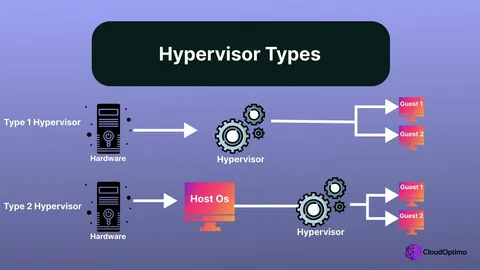
Microsoft Hyper-V is a Type-1 hypervisor built into Windows Server and Windows 11 Pro/Enterprise. It enables server and desktop virtualization within the Microsoft ecosystem. The key differences in Hyper-V vs VMware: Hyper-V is tightly integrated with Active Directory, Azure, and Windows licensing, making it cost-effective for Microsoft-centric environments. VMware offers more advanced enterprise features like vMotion, DRS, and NSX, but at higher licensing cost. T-Tech helps you choose the right platform.
How do I install Hyper-V on Windows 11?
To install Hyper-V on Windows 11, you need Windows 11 Pro, Enterprise, or Education. Go to Control Panel → Programs → Turn Windows Features On/Off → check Hyper-V and click OK. Alternatively, run Enable-WindowsOptionalFeature -Online -FeatureName Microsoft-Hyper-V-All in PowerShell as Administrator. After restart, open Hyper-V Manager to create and manage Hyper-V VMs. T-Tech can also perform this setup and full configuration for you.
Is VMware free to download and use?
VMware offers free VMware options: VMware Workstation Player (free for personal use), and VMware ESXi has a free hypervisor license with limited features. VMware vSphere Essentials and VMware Horizon require paid licenses. You can VMware download the installer from Broadcom's official site. For enterprise deployments, T-Tech handles all licensing procurement and compliance as part of our VMware managed services.
What is the difference between VMware Workstation and Hyper-V?
VMware Workstation hypervisor is a Type-2 desktop hypervisor that runs on top of Windows or Linux, ideal for developers, testers, and power users needing isolated VM environments. Hyper-V is a Type-1 bare-metal hypervisor built into Windows — more suitable for production server workloads. Note: VMware Workstation and Hyper-V cannot run simultaneously on the same Windows host unless using VMware Workstation 15.5.5+ with Hyper-V compatibility mode.
Can VMware run on Mac?
VMware Fusion for Mac is VMware's desktop hypervisor for macOS, allowing Mac users to run Windows, Linux, and other OS as virtual machines alongside macOS. VMware Fusion Pro is free for personal use as of 2024. For Apple Silicon Macs (M1/M2/M3), VMware Fusion supports ARM-based VMs natively. T-Tech can assist with VMware Fusion setup, optimization, and support for development teams using VMware for Mac environments.
How do I clone or back up a Hyper-V VM?
To clone a Hyper-V VM, use Hyper-V Export/Import — export the VM to a folder, then import it as a new VM with a new unique ID. For backup Hyper-V VM, use Veeam Backup & Replication, Azure Backup for Hyper-V, Windows Server Backup, or Hyper-V Checkpoints for quick snapshots. T-Tech implements automated Hyper-V VM backup schedules, offsite replication, and disaster recovery testing to protect your virtual infrastructure.
What is a secure hypervisor?
A secure hypervisor is a virtualization platform hardened against cyberattacks, unauthorized VM access, and hypervisor-level exploits. Both VMware ESXi and Microsoft Hyper-V support secure hypervisor configurations including Shielded VMs (Hyper-V), VMware vTPM, VM encryption, RBAC policies, and CIS Benchmark hardening. T-Tech implements security-first virtualization architectures ensuring your hypervisor and all guest VMs meet compliance and data protection standards.
Whether you have a technical question or need a complete IT solution, our experts are here to assist you with reliable and secure guidance.